
Toute l’activité
- La dernière heure
-

Des entrepôts de DFR on était était incendié !
Wanegain en réponse au topic de Isa dronic dans Evénements et rassemblements
J'ai vu ça hier, c'est dingue ! En plus avec leur stock de lipos ça a dû être impressionnant 😱 Je suis curieux de voir ce qui a causé le départ du feu... -
Il faudrait un peu plus d'info... Quel VTX ? Est-ce que tu l'as correctement configuré dans l'onglet Ports ? Si pas d'affichage, c'est que le VTX et la FC ne communiquent pas, donc vérifie que le câblage est correct, la configuration correcte..
- Hier
-
Bin déjà retrouve le schéma....on va pas deviner si ?
-
et non, ca serait trop simple 😉 , en analogique, le masque ne communique pas avec le ctx. soit tu - regles la puissance avant le decollage (via le menu betaflight, le backpack de ta radio ou a la main) - regles cette puissance dans betafight - assignes un switch pour le faire en vol (mon choix) j'ai eu longtemps un ev800dm, depuis , j'ai un cobra x : recepteur amovible plus sensible, menus plus ergonomiques, place pour des lunettes mon seul regret, pas de correction dioptric comme on peut ajouter sur le 800dm, j'ai bricolé une lentille de fresnel pour ca regarde dans les differents gps, y a des tailles differentes. a voir aussi avec le support que tu utiliseras maintenant, avec les puces m10, meme les tout petits gps refont l'affaire (en moyenne 25 a 28 satellites contre 8 a 13 pour une puce m8...)
-
Comme ça :
-

Des entrepôts de DFR on était était incendié !
Silverglade en réponse au topic de Isa dronic dans Evénements et rassemblements
Je viens d'avoir le mail également, j'espère qu'ils vont s'en remettre ! Toujours de bons contacts et produits avec eux. Ca a l'air que matériel c'est toujours ça de gagné -
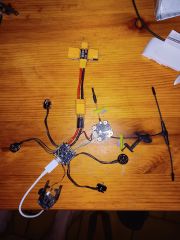
Bonjour Je quand je configure mon osd, je sauvegarde mais l'osd dans le casque ne s'affiche toujours pas
-

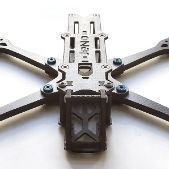
premier drone que je vais monter
shyrius3700TOURS en réponse au topic de shyrius3700TOURS dans Conseils
merci d'avoir répondu wanegain et jpcheney alors le buzer sera donc le Vifly Finder 2 les moteur je vais regarder tableau entre le 1750kv et le 1950kv pour l'instant je penche plutôt vers le 1750kv ( a confirmer) le tx 800...très bien tant mieux par contre question bête de m'as part mais jpcheney dis - le tx800 : tres bien, plus de 2km d eportée en 25mW , beaucoup plus en 800mW comment le tx gère sa "consommation" il va de 25mw a 800mw ? sa marche comment ? a 2klm environ 25mw ok mais si je dépasse les 2klm c'est un réglage a faire bref comment sa marche tous ca autre question pour le masque d'accords un ev800d ça irai très bien (pas chère) ...mais évidemment , y a mieux et plus cher. d'accord et quoi en analogique ? je veux rester sur un masque pour avoir mes lunette de vue en dessous pour la FC et les esc(4/1) ca as l'air correct je m'inspire d'un build que j'ai vu sur le forum même chose pour le RX et la camera il manque que le GPSm10,j'ai bien un gps mais il sert actuellement faut donc que j’achète un gps pour le drone les conseil sont les bienvenue pour le gps je voudrait pouvoir faire le retour to home avec et jpcheney dis.. le gps : puce m10 pour avoir un fix rapide, et plus l'antenne est grande, plus il est sensible c'est bête de m'as pars mais j'avais pas a la longueur de l'antenne (pour être plus sensible) je l'ai voyer tous identique je vais regarder pour le gps merci pour ses info -

Des entrepôts de DFR on était était incendié !
Isa dronic a posté un sujet dans Evénements et rassemblements
Hello a tous bon un évènement un peu fou mais des entrepôts de dfr on brûlé 😱! voilà leurs messages " Madame, Monsieur, Cette nuit, un incendie a gravement endommagé nos locaux et notre entrepôt. Au-delà du choc, c’est un événement difficile pour nous, et nous en mesurons encore les conséquences. Les dégâts sont importants et notre activité est, pour le moment, à l’arrêt. Nous faisons tout notre possible pour nous organiser et trouver des solutions, même si cela prendra du temps. Nous reviendrons vers vous dès que nous aurons davantage de visibilité. Merci sincèrement pour votre compréhension et votre soutien. Bien à vous, " -
bonjour je voudrais connecter une carte de vol diatone fury 3s avec un rx nano tracer avec une radio manbo quel connection faut il faire sur la carte de vol j ai 2 sortie ppm ou sbus comment connecter tout ca merci
-
JeNo 5.1" Classic version Ciné 1er Build
Isa dronic en réponse au topic de mitomchel dans DroneBuilds
Salut ! Non non pas de soucis, on partage notre expérience ! ah oui je parlais des Sequre seulement. -
Moteur vérifié, j ai aussi changé les protections au cas où ils provoqueraient des vibrations. Mais rien a changé malgré aussi la changement de dshot et la fréquence des esc Merci , super option que tu me donnes .Je vai voir de changer ma version de blujay 😀 pour la photo c est une vielle photo du projet cours ,depuis tout es repris et fixer , bien sûr que je met des écrous pour voler 😅 Pour cela , je suis pas sure de comprendre :FFT_FREQ à 2kHz Mais je vai regarder pour voir ce que cela est
-
Merci beaucoup ! Je te jure que dans la notice il n'y a pas de résumé comme tu viens de me le faire 😅 ou alors un rdv chez l'ophtalmo pour moi s'impose lol Mea culpa pour la base des lipos, j'avais pas pin la page je vais voir ça 🙂
-

INAV Octocopter X8 - 2 moteurs tournent en même temps (mauvais cablage? ou réglage)
Nimbus en réponse au topic de hugohawkeye dans Entraide
Hello j'ai le même problème que toi avec le moteur 1 et 4 qui tournent simultanément lors des tests moteurs. Est-ce tu as résolu ce problème? -
Les pins sont parfaitement alignés, quelqu'un a une autre piste à explorer?
-
Oui , je me suis dit la même chose au décalage de la stack . J ai commandé un 1000. J ai pensé aux aimants mais cela le ferait tout le temp.mais je vérifirais. Je fais aussi un essai en passant en 4k et dshot 300 et descendant les esc a 24 khz Oui bien sûr, brancher sur betaflight ou esc configurator. Le bruit est très beau . Rien ne bouge et solid quand on secoue . Aucun bruit particulier dans la black box
-
Je viens de voir qu'ils ont sorti une version analogique: FC Bastille Analogique – Lunpid
-
La FC sans écrou c'est très optimiste 😁 T'as testé de faire tourner les moteurs à vide dans betaflight pour voir si le bruit apparait ? Et quand tu secoues le drone à la main, ça fait ce bruit ?
-
En attendant un nouveau log où tu définiras le debugmode en FFT_FREQ à 2kHz et en laissant tous les éléments cochés: --> Je suis étonné de ne pas voir d'écrous sur la FC. Ta carte n'étant pas ici fixée, ton gyro peut zooker... Sur un F722 (F7 pas si puissant --> F7 du pauvre lol), tu peux switcher en DSHOT300 --> ça basculera automatiquement ta boucle PID à 4kHz (et tu ne verras et sentiras absolument aucune différence). --> Egalement, prends soin d'appliquer le preset RCLink adapté à ta liaison radio et ton packet rate (Hz), avec l'option Freestyle. Basculer la fréquence des ESC en 24kHz ne changera rien pour ce problème. Par contre, j'ai déjà rencontré des problèmes (et certains de mes potes) avec la version 0.21 de Bluejay. Je suis toujours en 0.19.2 (0.19 dans la GUI de Bluejay), avec les paramètres par défaut. Voici mes idées pour t'aider: Vois à fixer correctement ta FC avec écrous (même des nylons): Test --> Log. Reflashe tes ESC en 0.19 en PWM 48kHz (prends bien soin de réappliquer les paramètres par défaut pour tes ESC après leur flashage --> tu as un bouton en bas à droite pour ça. Attention au sens moteur de rotation moteur ensuite): Test --> Log. Attention aussi à tes soudures de fils moteurs sur les ESC... Avec ces petits pics d'étain qui remontent, tu risques des soucis de court-circuits 💥🔥
-
accus lion 21700 pb45 et version 18650?
shyrius3700TOURS a posté un sujet dans Batteries et chargeurs
je suis actuellement en 4s (auline 3000 mha vtc6 30A 451p...14,8 volt et 44,4 un pack lion classique...mais le prix 45euro voir 50euro.......a l’intérieur c’est 4 pile 18650 en fait câbler en série la version 21700 c'est Batterie Li-ion Auline 21700 A45 4S 4000mAh 1C 45A pour 55euro conclusion je vais faire mes accus moi même pour les 21700 des molicel a 45 de décharge rien a dire (très bien la question c'est plutôt pour les 18650 quelle marque choisir pour des 30 de décharge ? la hésité pas a donner votre avis la dessus moi je voie le cote pratique en 18650 tu as des support pour les piles juste un connecteur xt 60 et c'est fait (évidement tu refait le câblage en série avec la bonne section de fil) l'avantage c’est que tu peux vérifier la résistance interne de chaque accus individuellement est le changer sans aucun souci vu qu'il a pas soudure pour les 21700 plus compliquer j'arrive a trouver de support adapter...j'en suis au mode expérimentation avec des boitier epissable on verra cest que ca donne évidement il y a la solution simple ....souder mais la encore des soucis a l’étain mauvaises idée (trop risquer pour l'accus) avec la soudure par point (très bonne idée) mais la c'est le prix qui me pose probleme alors j’imagine que beaucoup se sont poser la question avant moi alors donner vos avis pour la soudure par point je voie que des gadget inefficace a pas chere si il y a une solution correct dite ou dites moi comment vous monter vos lion ? j'ai étais un peux vite pour les 18650 je pense idem au molicel en version Capacité: Nominal 2800mAh Tension nominale 3,6 V - 3,7 V Courant de décharge max: 35A -
le condo me parait petit pour du 2000kv en 6S..... mais je suis pas certain que ca joue. est ce que t'es certain que tous les aimants sont bien collés ? là ca fait un bruit comme si un aimant était décollé sur un moteur. ca mérite une petite inspection.
-
Pourtant tout est expliqué dans la notice 🤔 Ext. discharge (Décharge externe) : sert à décharger rapidement une batterie en utilisant une résistance externe. Regen. discharge (Décharge régénérative) : décharge "écologique", au lieu de dissiper l'énergie de la batterie sous forme de chaleur, le chargeur transfère l'énergie de la batterie à décharger (branchée sur le port de sortie) pour recharger une autre batterie (branchée sur le port d'entrée). Power supply (Alimentation électrique) : ce mode transforme le chargeur en alimentation réglable (tension de sortie entre 5V et 29V et puissance de sortie entre 20W et 300W) pour alimenter divers appareils. C'est un peu la base du chargement de LiPo ça 🙂
-
Oui, un moteur abimé, une fissure dans le carbone, un gyro fatigué...
-
très probablement, mais la BB est propre (sous JESC), et je ne comprend pas pourquoi JESC vole même sans RPM, alors que Bleujay part systématiquement en Flyaway (avec ou sans RPM). ce n'est pas la première fois que j'ai ce symptome (sans aller jusqu'au flyaway), mais j'ai des vols avec moins de vibrations en JESC qu'avec BJ. (alors que le dev de JESC est arrêté, et qu'officiellement, il n'est même plus recommandé par BF). il y a quelques années, je mettais cela sur le compte de la jeunesse de BJ, et j'espérais une amélioration...... mais ca n'a pas l'air de beaucoup évoluer.(on ne peut plus vraiment dire que BJ est encore en train de murir)....... après ca reste l'avantage de BLS.... soit ca passe en BJ, soit tu as toujours la possibilité de basculer en JESC.
-
bonjour j ai un probleme de bruit de cloche moteur pour un jeno 5" je viens de terminer , tout est neuf. j ai mis une stack JHEMCU JHEMCU RuiBet 45A/55A flashée en blujay fc JHEMCU GF30F722-ICM F7 moteur velox V3 en 2050 kv condo35v 470 et antisparks j ai essaillé de mettre des filtres , mais rien changé et aprés je me suis rappellé que cela pouvais etre les esc à mettre en 48 khz . mais cela était déja fait la boucle PID est à 8 khz et donc en DSHOT 600 il y a aucune erreur moteur (voir photo) (evidenment , j ai tout verifier , rien ne se balade , rien est desseré , moteur , helices , vis moteurs , ) cependant cela ne provoque aucune surchauffe moteur , juste des glishs sur le yaw . je suis un peu a cours de solutions à part redescendre ma boucle a 4khz et dshot 300 mais j y crois pas trop sinon pensez vous que descendre mes esc en 24khz pourrais etre une solution ? btfl_005.bbl voici ce que dit chat gpt , mais j ai moyen confiance 😵💫 : https://chatgpt.com/share/69c487d5-8bf0-8326-b1b5-0d78f8afc900
.thumb.jpg.6e5472f168db95efa0ee373a32037543.jpg)












-
Qui est en ligne 6 membres, 0 anonyme, 486 invités (Afficher la liste complète)
-
Statistiques des membres
10 924
Total des membres1 771
Maximum en ligne
-
Statistiques des forums
23,6k
Total des sujets261,9k
Total des messages -
Suivez-nous sur les réseaux sociaux !
-
-
-
-
-
-

-
-





-
-
Dernières photos de la galerie
-
Sujets récents
-
-
Contributeurs populaires
-
1
-
2

-
3
-
4
-
5

-
-
Sujets actifs
-
-
Sujets les plus commentés
-
-
Sur le blog
-
Ils ont besoin de votre aide !
-
-
Soutenir WE are FPV 👍
Pour nous soutenir, un petit clic en dessous avant d'effectuer un achat :















Les liens affiliés
Certains liens affichés sur le site et le forum sont affiliés. En tant que partenaire Amazon entre autres, nous pouvons recevoir une commission mais le prix que vous payez ne change pas, il reste au plus bas.